Briefs change
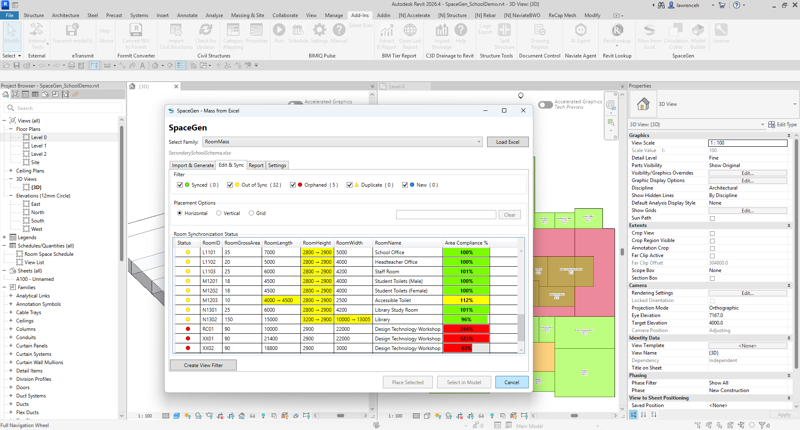
Programmes are refined daily, keeping Revit aligned to Excel is painful. SpaceGen syncs to the latest Excel, highlight items that are synced; out of sync; orphaned; duplicate and/or new.


Architects and design teams face the same early‑stage challenges on every project: shifting briefs, evolving area targets, rapid option testing, and the pressure to keep models and schedules in sync. Mass From Excel brings order to that complexity; letting you import programme data from Microsoft Excel, place and sync massing rapidly, visually check area compliance, and, when ready, generate walls, floors and Rooms from your massing model.


Programmes are refined daily, keeping Revit aligned to Excel is painful. SpaceGen syncs to the latest Excel, highlight items that are synced; out of sync; orphaned; duplicate and/or new.
It’s easy to miss rooms drifting from targets. SpaceGen creates colour‑coded compliance directly in views (traffic‑light logic), so issues are instantly visible without diving into schedules.
Testing layouts should be fast and reversible. Quickly arrange spaces whilst keeping tabs on area compliancy.
Design momentum stalls when data, drawings, and visuals diverge. SpaceGen maintains a lightweight audit trail (who/when synced) and make select‑in‑model by RoomID a one‑click action.
Maintain a clean data trail from briefed intent to build outcomes.
Make use of Revit from an early stage. Import headline areas from Excel. Build an initial massing set aligned to the brief.
Rapid test‑fit at scale. Colour‑by‑compliance views show where targets aren’t met. Iterate fast.
Rapid test‑fit at scale. Colour‑by‑compliance views show where targets aren’t met. Iterate fast.
Continue to sync as the brief evolves. Use numeric schedules and visual filters to police drift before issue.

Bind spreadsheet columns (targets, actuals, RoomID, type, notes) to Revit parameters.
Grid/line placement with adjustable gaps, horizontal/vertical layouts.
Statuses for Synced; Out of Sync; Orphaned; Duplicate; New; time/user stamps.
Resilient Revit view filters (no custom shaders), with simple, explainable thresholds.
Place new masses and automatically cut corridors from placed masses.
Convert massing to walls; floors and rooms when ready without re‑work.
The software solutions available through Naviate Tech Preview are provided free of charge and should be considered experimental. While we strive to deliver useful tools, they are still under development and may contain known or unknown issues.
We strongly recommend that you:
If you encounter any issues, we encourage you to report them to us.
Please be aware that these solutions may be updated, modified, or discontinued at any time. Some may evolve into official Naviate features in the future - while others may not.