

Release news Naviate for Revit
Naviate Zero December release news 2026 v26.2.0
Release news for Naviate Zero. The release includes the new features Design and Pre-Compliance, Export Thickness to OCL and Apply Resources - Quantities. There is also improvements to Apply Resources Material Update and Quattities, Naviate Assistant and Settings.
-
Feature
-
Feature
-
Feature
-
Update
-
Update
-
Update
-
Fix
This release news includes Naviate Zero 2026 v26.2.0 and are available on My Symetri -> Applications
Design and Pre-Compliance
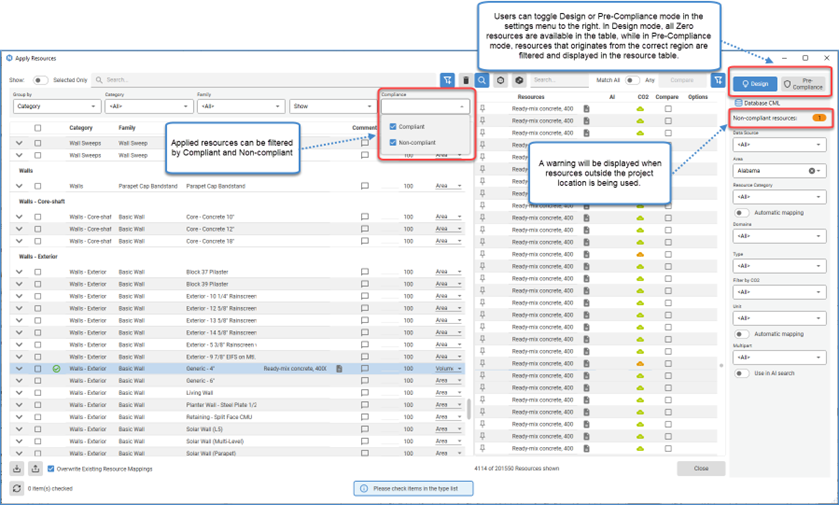
Users can now work in Design or Pre-Compliance mode, helping them find more relevant material data for different stages of a project.
Users can now:
- Quickly filter out available resources from their project region.
- A warning is displayed with the number of non-compliant resources that have been applied.
- All applied resources can be filtered by their compliant or non-compliant status.
Export Thickness to OCL
Material thickness is now included in the export to OCL when exporting System Families. In previous versions of Naviate Zero, a default OCL value was assigned, requiring users to manually edit these values in OCL after export.
Apply Resources - Quantities
Apply Resources has been updated to give you clearer insight and control over what goes into your CO₂e calculations.
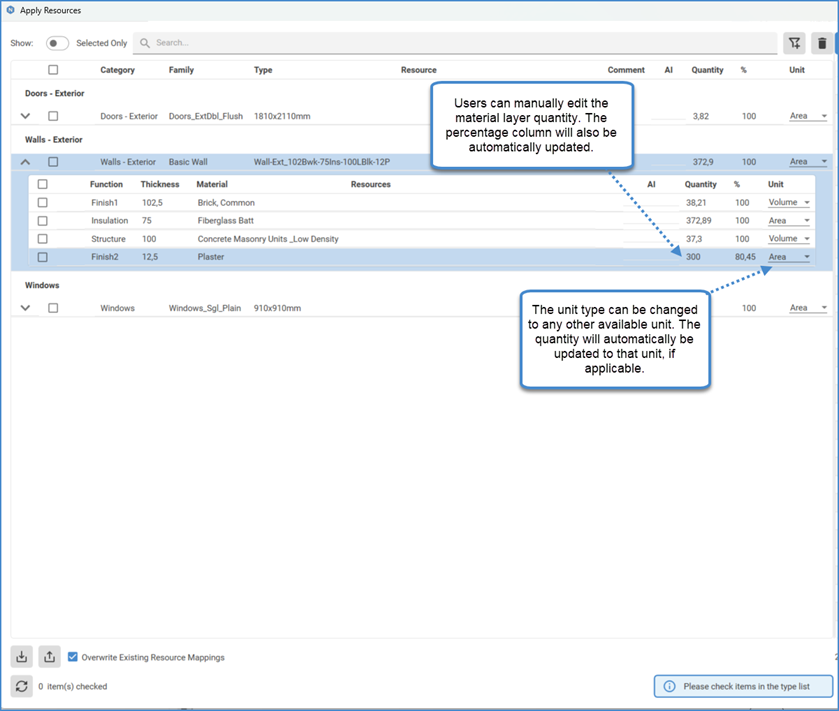
Users can now view material quantities for each family type, including a breakdown of their individual material layers. These displayed quantities represent the exact totals used in the CO₂e assessment, ensuring full transparency in how results are calculated. Additionally, users have the option to manually adjust the displayed quantities when necessary, ensuring that calculations can be tailored to project-specific requirements or refined inputs.
Apply Resources - Material Update
Apply Resources has been updated to display all material layers of System Families individually. Previously, layers composed of the same material were grouped together. With this enhancement, users can now also view the function and thickness of each layer when applying resources. This change does not affect Loadable Families.

Naviate Assistant
The Naviate Assistant is now accessible outside of the Compare Tool. It can be launched directly from the Resource Table or the Revit Family Table where resources have been applied. This improvement eliminates the previous limitation of requiring a resource comparison in order to access the Naviate Assistant, streamlining the user workflow.
Settings
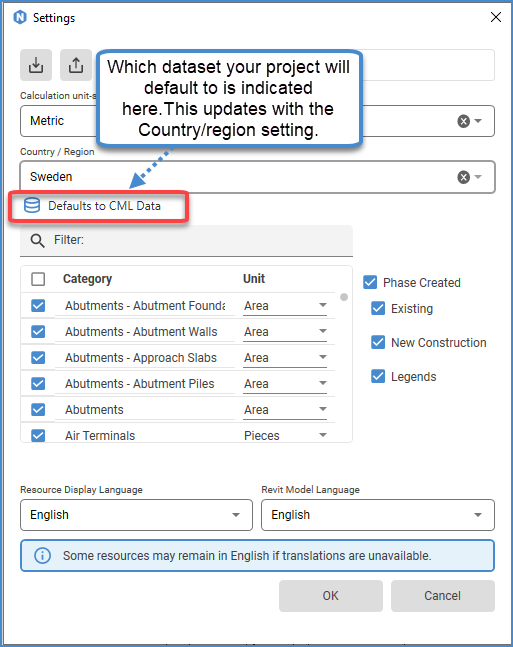
Projects now automatically defaults to TRACI or CML data sets, depending on the project location. This will affect the filtering of resources inside of Apply resources.
Fixes
- Apply Resources - Fixed issue with percentages being reset to 100 when applying resources.
- Apply Resources - Fixed apply resources data grid scaling wrong when resizing the window.
- Apply Resources - Fixed issue with icon sometimes being displayed even though no resource had been applied.
- Apply Resources - Fixed thickness not being converted properly on some machines, causing errors in calculations.
- Apply Resources - Fixed domains not being loaded properly.
- Apply Resources - Fixed apply resources showing resources with unsupported units.
- Apply Resources - Fixed translations always being loaded when apply resources are opened.
- Apply Resources - Fixed Apply resources not being able to open some older projects.
- Fixed settings not being able to open when International had been chosen during installation.